


















Home
chevron_right
Store
chevron_right
Audi
chevron_right
Q5
chevron_right
Audi Q5 / SQ5 (FY, 2017–2020) CarPlay & Android Auto Navigation in Instrument Cluster
Product description
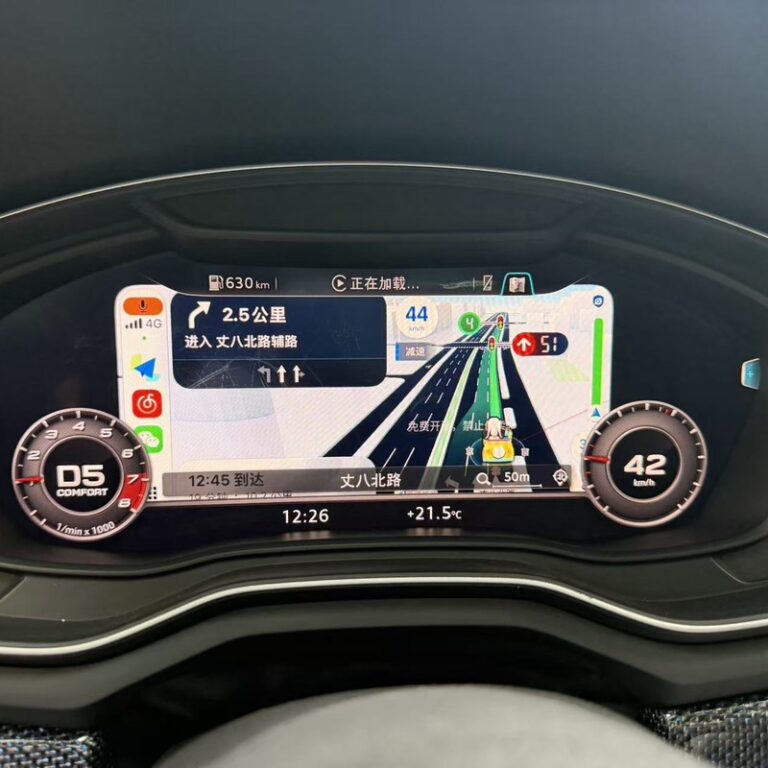
Audi Q5 (FY) CarPlay map on the digital instrument cluster (Audi virtual cockpit). The Apple CarPlay navigation map (Google Maps, Waze, Apple Maps) is shown in the instrument cluster behind the steering wheel, so you do not have to look away to the centre screen.
Requirements
- Factory-fitted digital instrument cluster: Audi virtual cockpit 12.3″.
- MMI Navigation plus (MIB2 High) peaseade. MIB2 Standard (Composition / Discover Media, Swing, Bolero, Amundsen, Media System) is not supported.
- Working Apple CarPlay (if needed, we activate it at the same visit, see add-ons).
Supported software versions
The solution works only on specific software versions:
MHI2Q_ER_AUG22_P5092 / MHI2Q_ER_AUG22_P5152(MU1329): Audi virtual cockpit 12.3″. Route guidance arrows/lanes/eta in cluster + hud, 30fps altscreen, 5.1 spatial soundMHI2_ER_AUG22_K3344 / MHI2_ER_AUG22_K3346 / MHI2_US_AUG22_K3345 / MHI2_US_AUG22_K3347 / MHI2_ER_AUG22(MU1438): Audi virtual cockpit 12.3″ (LVDS, classic layout). Carplay automatic takeover & wheel zoom; android auto 1080p scaled to 1440×540
If your car has a different version, ask us whether a suitable version can be installed with a software update.
Will it work in my car?
The same model and year can come with different multimedia systems, so compatibility is decided by the software version, not the year. Press the MMI MENU button and select Setup MMI → System maintenance → Version information.
Your car fits if the software version starts with: MHI2Q_ER_AUG22_P5092, MHI2Q_ER_AUG22_P5152, MHI2_ER_AUG22_K3344, MHI2_ER_AUG22_K3346, MHI2_US_AUG22_K3345, MHI2_US_AUG22_K3347, MHI2_ER_AUG22
The safest way: before buying, send your VIN or a photo of the version information screen to autonavi@pilvepank.ee and we will tell you whether the service fits your car.
How does the activation work?
The change is made in software in the car's original multimedia system. No extra devices, adapters or cables are installed in the car. Before the change we make a backup of the system. The work is done at our premises in Tallinn, or we guide you through it over a remote connection.
If the dealer later updates the multimedia system software, the activation may need to be renewed. AutoNavi terms of sale apply.
Related products