














Home
chevron_right
Store
chevron_right
Skoda
chevron_right
Octavia
chevron_right
Skoda Octavia IV / RS (NX, 2020–2024) Skoda SmartLink Apple CarPlay & Android Auto Activation
Product description
Skoda Octavia IV / RS (NX, 2020–2024) Skoda SmartLink Apple CarPlay & Android Auto Activation.
Many 2020–2024 Skoda Octavia IV cars already have the smartphone interface hardware fitted from the factory, but the SmartLink function is locked by licence. We activate it in your car's original MIB3 (Bolero / Columbus) system with factory SmartLink support without installing extra devices.
What you get
- Apple CarPlay (wired and wireless): Waze, Google Maps, Apple Maps, Spotify, phone calls and messages on the car's large screen.
- Android Auto (wired and wireless): Waze, Google Maps, Spotify, YouTube Music and Google Assistant.
- Control with steering wheel buttons and voice commands exactly as with factory equipment.
- Lifetime permanent activation: no monthly or annual fees.
Check your screen type before ordering:
✓ FITS (ACTIVATABLE)
10″ Ekraan — Bolero / Columbus (MOI3)
Screen code: 5E3919605 (peaseade 5E3 035 816...)
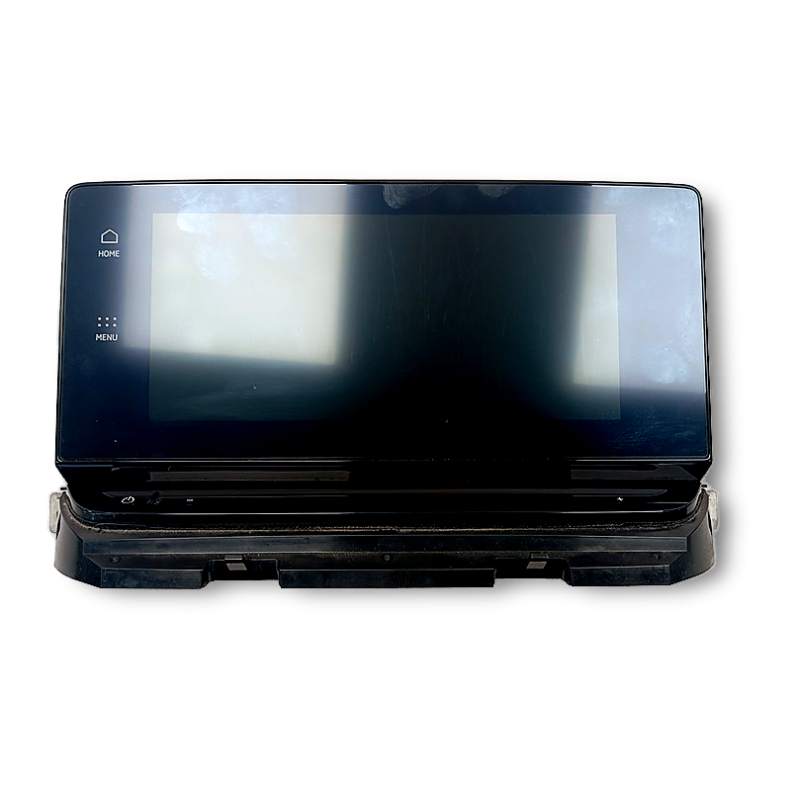
- Fully flat glass screen, there are no physical rotary knobs.
- Below the screen there is a touch-sensitive volume slider.
- Firmware kood algab: MOI3 (nt.
MOI3_EU_SKMQB_...). - Supports both with a cable rather than wireless Apple CarPlay and Android Auto.
✕ DOES NOT FIT (WE DO NOT ACTIVATE)
8,25″ Ekraan — Swing (MEN3 Entry)
Device code: 5E3035869B (or 5E3 035 869 ...)
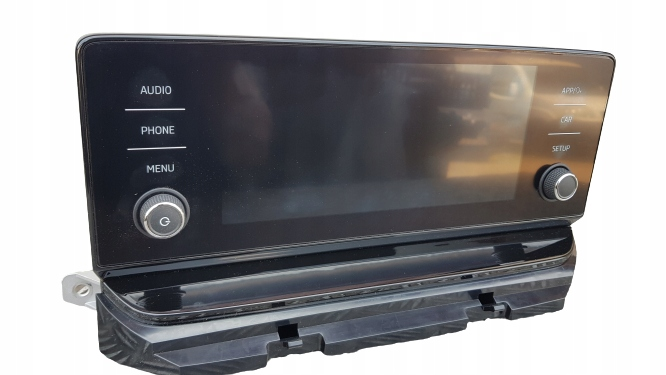
- Smaller 8.25″ screen with a wide plastic frame.
- Two physical rotary knobs in the bottom corners of the screen (volume and menu).
- Buttons on the sides (AUDIO, PHONE, MENU / APP, CAR, SETUP).
- Firmware kood algab: MEN3 (nt.
MEN3_EU_SKGPX_...).
⚠️ ATTENTION: there is no aftermarket software solution for MEN3 devices. We do not activate MEN3 devices!
Kuidas kontrollida tarkvaraversiooni?
- Service menu (the safest way): Switch on the car's system and hold on the device MENU button, about Hold down for 5–10 seconds, kuni ekraanile avaneb Service Mode. Select from there Software version display (Software versions). Fits if the software line starts with the code MOI3 (nt
MOI3_EU_SKMQB_P30800P). - Tavamenüü: Press MENU ➔ Settings (Settings) ➔ System settings ➔ System info. NB! Scroll the list all the way up to the beginning, to view the device code and software.
Juhtmevaba SmartLink: It also depends on the software version and the WiFi hardware. To check this we need your car's VIN and VCRN code, which we will verify for you free of charge before you order.
If in doubt, send us a photo of the screen or your car's VIN to the address autonavi@pilvepank.ee and we will confirm compatibility!